🍎 macOS 14+  ·  free  ·  open source

Your clipboard, but it
remembers everything.

Ditto is a native macOS clipboard manager. Every copy — text, rich text, images, files — is kept, searchable and one keystroke away. It's the unofficial macOS sibling of the Windows classic Ditto.

Downloads the latest build automatically. First launch: right-click → Open, since the app isn't notarized. Needs Accessibility access to paste — see the README.
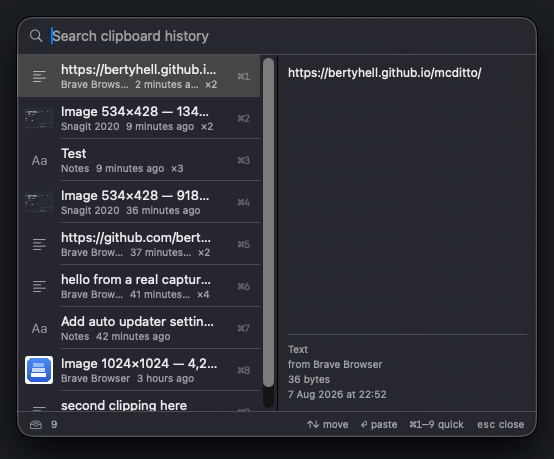
The Ditto history popup open over a browser, showing five clipboard entries with a search field and a preview pane on the right.

Everything you copy, kept

macOS gives you one clipboard slot. Ditto gives you thousands.

🗂️

Full history, not just text

Plain text, rich text (RTF/HTML with formatting preserved), images and files are all recorded with the flavor that best fits where you paste them.

⌨️

⌘⇧V opens it anywhere

A borderless, resizable popup appears right at your mouse pointer in any app, on any Space — no menu bar detour.

🔍

Type to search

Full-text search across your whole history, ranked by relevance and recency, with instant results as you type.

↩︎

Pastes for you

Pick an entry and Ditto switches back to your previous app and sends the keystroke — you don't even reach for ⌘V.

🧹

Cleans up on its own

History is capped at 10,000 entries and anything unused for a year quietly ages out. Both limits are adjustable.

🔒

Private by default

Everything lives in a local SQLite database. Password managers' concealed clipboard entries are never recorded.

Keyboard-first

The mouse is optional.

⌘⇧VOpen the history popup at the mouse pointer
typeFilter entries by content
↑ / ↓Move the selection
Return, double-clickPaste the selected entry into the app you were using
⌘1 … ⌘9Paste the Nth visible entry directly
⌘⌫Delete the selected entry
EscClose the popup

Nothing leaves your Mac

  • Local storage only — history lives in ~/Library/Application Support/mcditto.
  • No network access — the app makes no requests at all.
  • Password managers respected — concealed pasteboard entries are skipped automatically.
  • Per-app exclusions — block specific apps from ever being recorded, in Settings.